How I found it
Recently I was doing some routine work on a production Rails app. Before I touch any codebase, I have a habit to run some quick checks. One of them is this:
git ls-files | grep -E 'master\.key|credentials.*\.key'
This time it returned something:
config/credentials/production.key.
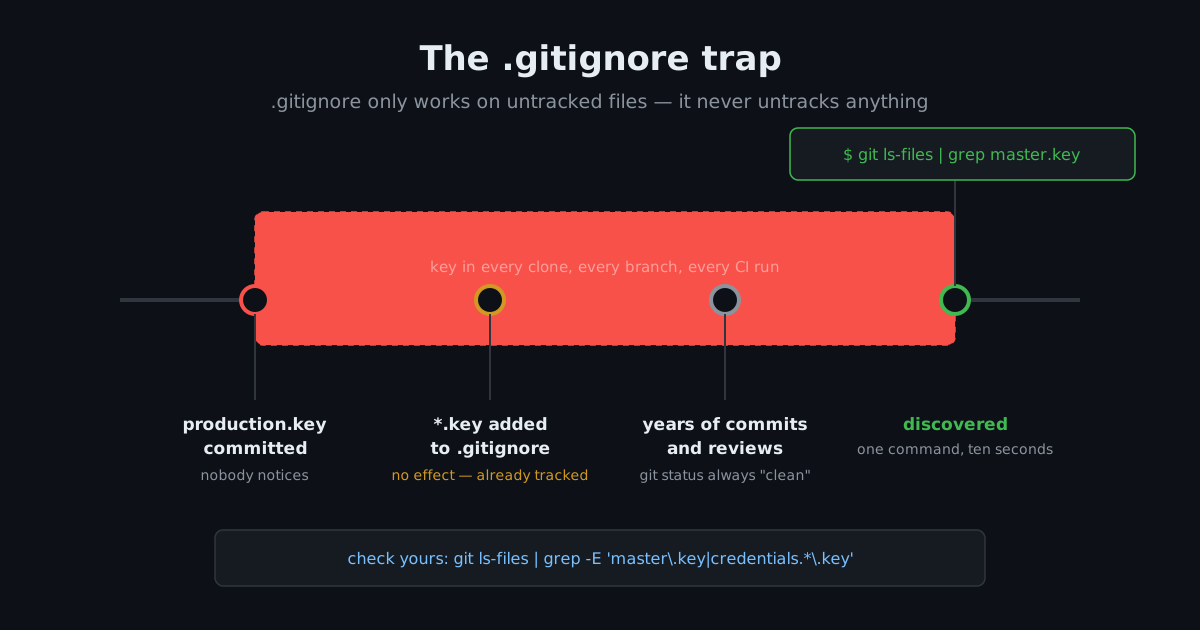
This key decrypts every production secret of the app — Stripe live keys, AWS credentials, database password, everything. And it was tracked in git for more than three years. Every clone, every branch, every CI run had it.
Here is the part that surprised me the most:
the file was listed in .gitignore.
Everyone on the project did the "right thing" and believed it was safe.
The .gitignore trap
The failure happens like this, and I think it is very common:
- Someone commits the key file early in the project. Maybe by accident, maybe before the team agreed on conventions.
- Later, someone adds
config/credentials/*.keyto.gitignore. - Nothing changes. .gitignore only works on untracked files. A file that is already tracked stays tracked forever, no matter what the ignore rule says.
- After that, every
git statuslooks clean. Every code review passes. The key stays in every commit for years.
So you can have a perfect .gitignore and
still push your master key to everyone with repo access. The ignore file
is only a rule for the future. It does not clean up the past.
"But the repo is private"
I hear this every time, so let me explain the real threat model. A key in a private repo is exposed to:
Every collaborator, past and present
In this case, multiple people could decrypt production secrets — including people who stopped working on the project long time ago. When someone leaves the team, their old clones do not leave with them.
Every laptop with a clone
Laptops get lost, sold, stolen, or just sit at someone's house without disk encryption.
CI systems
Every CI runner that checked out the repo for three years had the key.
The git hosting itself
And anyone who compromises an account with repo access. One phished GitHub password and they have your Stripe live keys.
"Private" only makes the audience smaller. The exposure is still there. And different from a password, you cannot know if a key in git history was already copied by someone.
Check your repos right now
Two commands. Run them in every Rails project you have:
# Is a key file tracked right now?
git ls-files | grep -E 'master\.key|credentials.*\.key'

# Was one EVER committed, even if deleted later?
git log --all --oneline --follow -- config/master.key config/credentials/
The second one is just as important. Deleting the file in a later commit only removes it from the working tree, not from history. Anyone can checkout the old commit and read it.
If any command returns something, keep reading. If not, good — but run it on your next repo too.
What rotation actually means
Finding the leak is the easy part. Here is the uncomfortable truth: rotating only the master key fixes nothing. Anyone who has the old key already could decrypt the credentials file. So every secret inside it is compromised. All of them.
The credentials file on this app had a few dozen secrets. The rotation order I used:
1. Money and access first
- Stripe live keys — roll them in the dashboard. Be aware that webhooks will break for a short time until you update the endpoint config, so plan the window.
- AWS access keys — create new keys in IAM, deploy, and then deactivate the old ones. If you deactivate first, S3 uploads break while you are still updating.
- Database password — coordinate with a deploy, or the app loses connection in the middle of requests.
2. The one you cannot just rotate
active_record_encryption keys
encrypt user data at rest. If you rotate them without a plan, you do not
lock out the attacker — you lock yourself
out from your own data. Rotating them means re-encrypting every
encrypted column with the new key. That is a migration project, not a
dashboard click. Document it, plan it separately, and do not let it block
the rest of the rotation.
3. Everything else
Mail provider credentials, API tokens, webhook secrets, reCAPTCHA, Redis,
OIDC signing keys, monitoring DSNs. It is tedious, but each one is just
login and roll. Go down the list from
Rails.application.credentials.config.keys
— that is your inventory. Do not trust your memory, trust the list.
4. Now the master key itself
When everything inside is rotated, generate a fresh key and re-encrypt:
rm config/credentials/production.yml.enc config/credentials/production.key
bin/rails credentials:edit -e production
# paste in the rotated secrets
5. Clean the history
pip install git-filter-repo
git filter-repo --path config/credentials/production.key --invert-paths --force
git push --force --all origin
git push --force --tags origin
Then tell every collaborator to re-clone. Their existing clones still have the old key in history — the force push cleaned the remote, not their laptops. (This is also why history cleaning is only hygiene, not the fix. The rotation is the fix.)
6. Verify the trap is really closed
# should report the file as ignored
git check-ignore -v config/credentials/production.key

# should return nothing
git ls-files | grep production.key
The same two commands that found the problem now confirm it is gone. You can put them in CI if you never want to think about this again.
The judgment call nobody writes about
One more thing from the real incident. I found this at night, on an app where payments are involved. The tempting move is to rotate everything immediately — it feels like the responsible thing.
I did not do that. The key was exposed for years already. A few more hours changes nothing about the risk. But rotating live payment keys at midnight, tired — that is how you turn a quiet problem into a real outage. I scheduled a focused session for the morning, worked through the list in priority order, and deployed with a clear head.
Urgency is for active breaches. For a long-standing exposure, a calm and ordered rotation is always better than a panicked one.
The takeaway
.gitignoredoes not untrack files. Check what is really in the index, not what the ignore file says.- Private repos leak sideways — collaborators, clones, CI — not only to the internet.
- A leaked master key means every secret inside is compromised. Rotate the contents, not only the key.
git log --all --followon your credentials paths takes ten seconds. It can find three years of exposure.
This happened during normal work, on a mature app maintained by
experienced developers, with a correct-looking
.gitignore.
That is exactly why I run these checks on every codebase I touch now — the
apps that look fine are the ones nobody checked.
Some details in this post are changed or generalized so the app cannot be identified.
FAQ
Does .gitignore remove files that are already committed?
No. .gitignore only
affects untracked files. A file that is already tracked stays tracked
forever, no matter what the ignore rule says. Check with
git ls-files | grep master.key.
What should I do if my Rails master key was committed to git?
Rotating only the master key is not enough — every secret inside the
credentials file is compromised. Rotate all secrets first (payment
keys, cloud credentials, database password, API tokens), then generate
a fresh master key, then clean git history with
git-filter-repo
and have all collaborators re-clone.
Is a leaked key in a private repo still a security problem?
Yes. A private repo exposes the key to every collaborator past and present, every laptop with a clone, CI systems, and anyone who compromises an account with repo access. "Private" only makes the audience smaller — the exposure is still there.
Vibol Teav
Software engineer with 13+ years of experience building and deploying Rails applications. Currently focused on Rails security audits, infrastructure, and helping teams ship with confidence.
Secrets exposure like this is one of a few dozen checks in every audit I run. If you prefer someone else to run these commands against your codebase (and everything else on the list):
Get a Rails Security Audit